

Background
It is possible to boot unlicensed software on the Sega Dreamcast. People have developed software that allows for bidirectional communication over several ports on the Dreamcast. So you can run a certain piece of software and it will allow you to read information from a connected device and load that software and run it.
There’s the serial port, the Broadband Adapter, or LAN Adapter. The serial port is located on the back of every Dreamcast. It requires a special cable to handle the communication and directing everything to the correct pin etc. The Broadband Adapter and LAN Adapter are replacements for the included Modem. The LAN Adapter is a 10mbps ethernet card that was release only in Japan. The Broadband Adapter is a 100/10mbps ethernet card that was released in Japan and the US. Other than that, all you need is a standard ethernet cable.
The Dreamcast has a very minimal operating system. Unlike modern consoles which typically boot into a dashboard, the Dreamcast was designed with the idea that you put in a game, you press Power, and you play. No news, no stores, no ads. So the Dreamcast itself does not concern itself with managing the network interface, that’s the job of the software running. Which means that the software running has to do things like acquire an IP address and all the other things.
The Problem
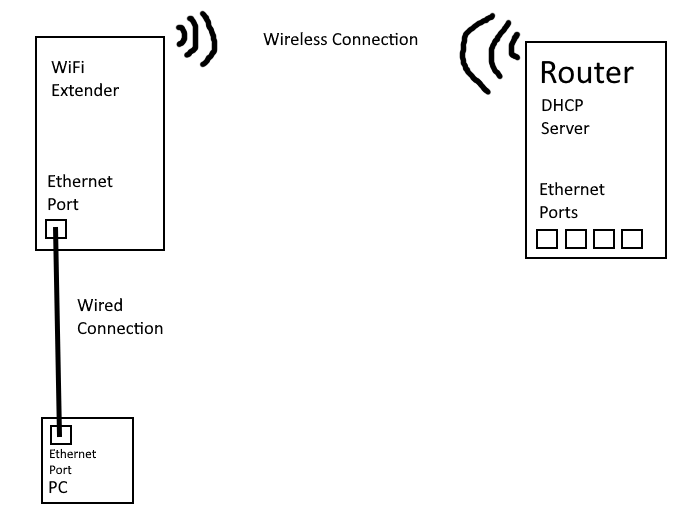
The router/modem is pretty far away from where I’m doing my development. It’s impractical to have an ethernet cable spanning the house. So I bought a wifi extender with an ethernet port to bridge the connection. Basically this
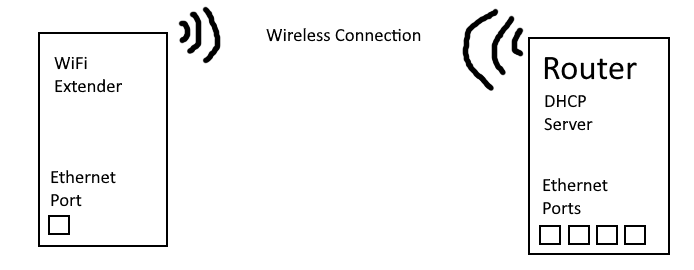
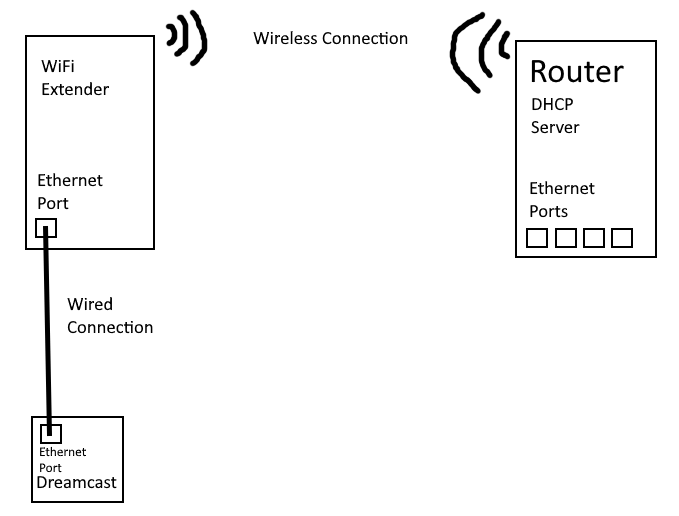
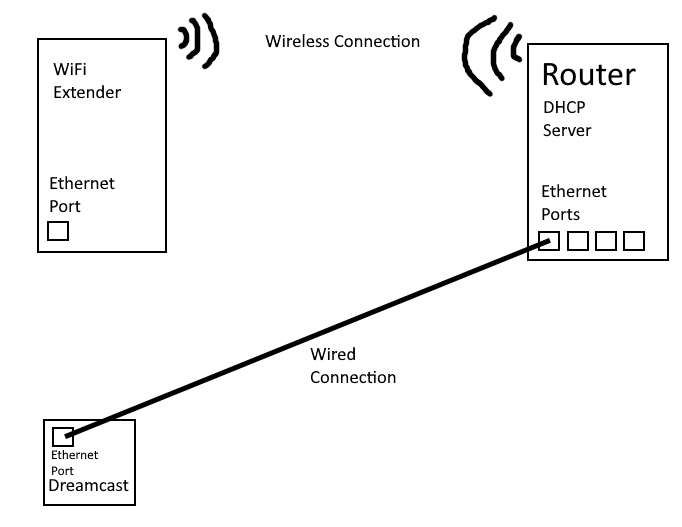
However, whenever I plugged in the Dreamcast and booted up DCLoad-IP, it would not get an IP through DHCP. Eventually, I tried other configurations, trying to find out where the failure is. Connecting the Dreamcast to the router directly allows the Dreamcast to get an address. Other PCs connected to the extender gets an address as expected. The only combo that doesn’t work is Dreamcast to extender.
It’s the Packets
This points to something with how everything is implemented in dcload-ip. After discussing the issue with some of the people in Discord, I loaded up Wireshark to see what’s passing over my network. I can see the Dreamcast making the necessary request and the router making the offer, but nothing after that.
DHCP (as I understand it)
There are four parts to acquiring an IP address via DHCP
- Discovery – The client, in this case the Dreamcast, blasts out a discovery message, asking if there are any DHCP servers on the network.
- Offer – If there are any DHCP servers on the network, it will respond to the Discovery message by reserving an IP address and offering it to the client that made the Discovery.
- Request – The client receives the offer and can then request the address being offered from the server.
- Acknowledgement – When the server receives the request, it will remove the IP address from the available pool and notify the client.
It is then up to the client to configure its network adapter.
The Dreamcast sends the Discovery. The router hears it and sends an Offer. And this is where things end. The Dreamcast never makes a Request. Now, what I don’t know is whether or not the Dreamcast has even received the Offer. Because the two options here are either the Offer doesn’t make it to the Dreamcast or the Offer packet is structured in some way that dcload-ip doesn’t know how to handle. So my next step is to modify dcload-ip to display more information. Because I can’t exactly attach a console to it and read stdout.
The Source
Not the Highlander movie.
I forked sizious’s dcload-ip repository and started poking around. I see where things are supposed to be happening, now it’s just a matter of reporting that back to the screen. Because I’m flying mostly blind here. I can’t load to the Dreamcast, I can’t report from it. Any information I get has to come from the screen.
I knocked together a quick and dirty string display to an arbitrary line and peppered some reports throughout the areas where I thought it would occur. And then trying to trace the problem back to the source.
The first task was simply to find the program’s entry point. Some grepping found the main in dcload.c. It detects the adapter, initializes it, and then basically loops the loop function of the adapter. The adapter’s loop function checks to see if we need an IP address and then calls a method that performs the DHCP handshake. There’s some traveling, but eventually there’s a packet processing function. This function checks the packet to see if it is directed or a general broadcast. If it’s a broadcast, it checks to see if it’s an ARP packet or not. If it’s not an ARP packet, we drop it.
And there’s the problem. The DHCP Offer is broadcast, but not as an ARP packet. I don’t know how it comes in from the router directly, but coming across the repeater, it’s a non-ARP broadcast packet. So what I did was check to see if it’s an IPv4 packet first and then shunt it to the directed packet processing function.
And it worked. The Dreamcast got an IP address and I could successfully upload binaries.
Next Steps
Things get a little circular. The path of the DHCP handshake goes (roughly) from dcload.c -> adapter.h/rtl8139.c -> dcload.c -> dhcp.c -> adapter.h/rtl8139.c -> rtl8139.c -> net.c -> net.c -> net.c -> dhcp.c
So as you can see we bounce between dcload, rtl8139, dhcp, and net. This is a bit of a web. Ideally, we’d essentially go only one way. dcload.c can call rtl8139.c or vice versa, but not each other. So what we have to do is identify what each module is supposed to do and reconfigure things so they just do the one thing. And we can modularize things better so that the modules aren’t calling each other.